
0%
Artificial Intelligence

An AI Assistant for Your School: Just Ask, by Typing or by Voice

The MySchoolOS™ AI Assistant works from your own school’s data. Ask one question in plain language and get the answer without opening ten screens. It also guides your team through any task inside MySchoolOS™.

  • Plain-language answersFees, attendance, results, staff and transport, in seconds.
  • Voice and textSpeak your question or type it, at the front desk or on the move.
  • Made for every roleOwners, principals, teachers and office staff all get answers in simple words.
  • Step-by-step guidanceAsk how to do a task and the assistant walks your team through it.
  • Question paper generatorTeachers prepare question papers by class, subject and difficulty, and edit them before use.
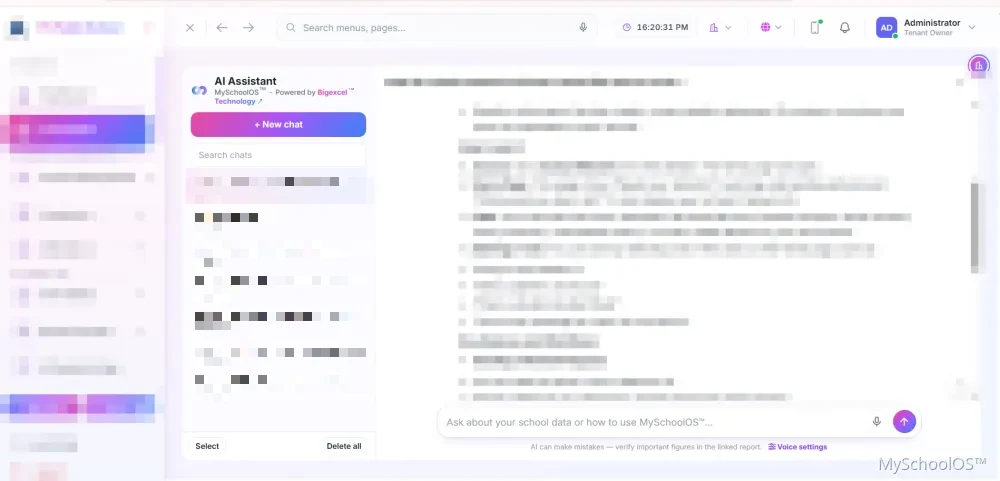
MySchoolOS™ AI Assistant
MySchoolOS AI Assistant answering a question in plain language, with chat history and voice settings
Try asking: How much fee did we collect today? What is the total outstanding fee? Which class had the lowest attendance this week?

Real MySchoolOS™ screen, with school details hidden. Answers come from your own school’s data and depend on your plan.

Where it helps

How Schools Use the MySchoolOS™ AI Assistant

The same assistant, useful to every role.

School owners

Ask for the numbers behind the school, such as fee collection or attendance, without waiting for a report.

Principals

Get quick answers about students, staff and results, and find your way around any screen.

Accountants and front office

Look up dues and collections, and ask how to complete a task instead of searching for the right screen.

Teachers

Prepare question papers by class, subject and difficulty, then edit them before use.

New staff

Learn MySchoolOS™ by asking. The assistant explains tasks step by step.

Multi-campus groups

Ask about one campus or compare them.

AI You Can Use Responsibly

  • It works from your own school’s data, not from other schools.
  • Availability of AI features depends on your plan.

AI Assistant and Risk Center FAQ

You ask a question in simple words, by typing or by voice, and get an answer from your own school's data. It can also show your team how to do a task in MySchoolOS™.

It works only with your own school's data. Ask us in a demo how your school's data is protected.

Yes. You can speak or type. This depends on your plan.

Yes. They can ask how to do a task and get simple steps.

It is a red, yellow and green view that helps owners and principals see where to look first.

It is made for owners and principals who want to see what needs attention without reading many reports.

AI features depend on your plan. We tell you exactly what is included in your quote.

See the AI Assistant on Your Own School’s Workflow

Book a demo and ask it your own questions. You can also see how the Risk Center points owners to what needs attention.

Book a DemoBook a Demo